
{{around lunchtime}} September 3rd, 2006 › pjw-mime-config v0.90 released

A while ago I released a simple plugin which allows you to manage the mime-types supported by the WordPress inline-uploader. This plugin worked well for most people baring a issue with php shorttags which made it break some sites. However, some people requested an update to the plugin to support adding a large list of mime-types from a file. I am proud to announce that finally after many months of sitting there 95% finished I am ready to release this plugin update.


Here is the detailed list of changes since the previous version:

  • Added support for mime-types described in a file
  • Changed the plugin to initialise on the “init” hook rather than at include time
  • Added support for mime-types described in a file
  • Fixed the shorttags issues

As ever the plugin adds a new options page as Options … Mime-types which allows you to add/delete the extra mime-types.
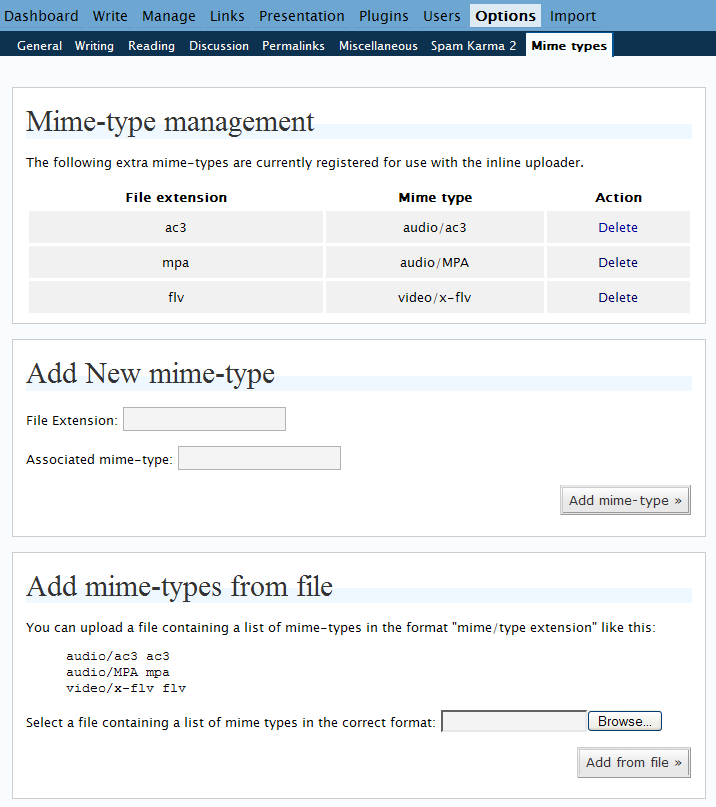
screenshot of the plugins options page

By default the following extra mime-types are registered: audio/ac3, audio/MPA and video/x-flv.

The latest version of the plugin may be downloaded here: pjw-mime-config.0.90.zip

« This entry is part of a series read the rest: 1, 2, 3 »
Read 18 Comments

18 Comments »

[...] Beim lezten Post wollte ich die Google KML - Datei mit WP hochladen. Ging nicht, weil der Mimetyp nicht eingetragen war. Also erstmal ein Plugin finden um Mime-typen hinzuzufügen. Im Sourcecode wollte ich nicht rumpfuschen. Peter Westwoods pjw-mime-config schien ganz gut zu sein. Er hat sogar einene Textdatei-Importfunktion. Also musste ich eine Seite mit ausreichend Mime-typen finden - bzw mit denen die ich auf jeden fall drin haben wollte.. Gefunden hab ich sie bei nifty. Viel chinesisch, aber das macht ja nix. Das ganze durch Programmers Notepad gejagt: [...]

Pingback by Cogito ergo sum… » Blog Archiv » Deutlich zu wenige mime-typen in WP — 11/9/2006 @ 2:14 pm §


Made a list with 386 Mime-types. In case it is usefull for someone.

Comment by Morty — 11/9/2006 @ 2:20 pm §


[...] I decided to add this post because I for one needed to attach some files (exe, dll, msi) to a posting..and Wordpress wouldnt allow me to do so; so i googled and googled and found a handy little plugin that allows for me to modify the allowed file extensions (and mime-types). Peter Westwood created the plugin, the original page can be found at: http://blog.ftwr.co.uk/archives/2006/09/03/pjw-mime-config-v090-released/#more-163 Besides the plugin, I’ve attached a list of 390 custom file extensions (and their associated mime-types). [...]

Pingback by JJs wee blog » Editing the allowed list of attachments for your WordPress blog — 17/12/2006 @ 1:14 pm §


[...] finden um Mime-typen hinzuzufügen. Im Sourcecode wollte ich nicht rumpfuschen. Peter Westwoods pjw-mime-config schien ganz gut zu sein. Er hat sogar einene Textdatei-Importfunktion. Also musste ich eine Seite [...]

Pingback by Cogito ergo sum… » Blog Archiv » Deutlich zu wenige mime-typen in WP — 24/1/2007 @ 10:48 pm §


[...] a plugin that is actually a lot nicer and already has the web interface that let’s you easily add new mime types to wordpress These icons link to social bookmarking sites where readers can share and discover new web [...]

Pingback by » Upload Mime types plugin for wordpress - PatchLog - Blog Archive — 8/5/2007 @ 8:51 pm §


[...] Install the MIME Config Plugin. [...]

Pingback by Infotropism – Weaning yourself off LJ: Images and video — 16/6/2007 @ 7:10 am §


I’ve tried to use v0.90 with WP 2.2.1, and it failed to register reg (Windows registry) files properly as text/plain. Now the reported MIME type is MP3. Is there any way to fix this?

Comment by l0b0 — 10/9/2007 @ 1:35 pm §


I’ve tried to use v0.90 with WP 2.2.1, and it failed to register reg (Windows registry) files properly as text/plain. Now the reported MIME type is MP3. Is there any way to fix this?

In the admin panel you can delete individual entries. Therefore you should be able to delete the entry for .reg files and then create a new one that is correct.

Comment by westi — 10/9/2007 @ 5:20 pm §


In the admin panel you can delete individual entries. Therefore you should be able to delete the entry for .reg files and then create a new one that is correct.

I tried deleting all MIME-config entries, and the file itself, and then upload the file again. It didn’t help. It’s still downloaded as an MP3 file. I also tried changing functions.php (to include “reg” with the text/plain formats), and uninstalling MIME-config before uploading again, but it seems to be completely broken. Any tips would be great.

Comment by l0b0 — 10/9/2007 @ 5:31 pm §


I tried deleting all MIME-config entries, and the file itself, and then upload the file again. It didn’t help. It’s still downloaded as an MP3 file. I also tried changing functions.php (to include “reg” with the text/plain formats), and uninstalling MIME-config before uploading again, but it seems to be completely broken. Any tips would be great.

Ok. It sounds like your server is configured to return a mime-type of MP3 for .reg files and as such that is what is being returned.

The list of mime-types in WordPress (and hence in the plugin) affects what you can upload to the server - it is effectively a whitelist of allowable file types - the mime-type info is stored along with the extension so as to be available when WordPress or a plugin wants to do something special based on mime-type - at present the only mime-types that WordPress does anything special with on presentation is images - where is extras the width and height to put into the generated html.

Comment by westi — 10/9/2007 @ 5:44 pm §


Are you sure that mp3 is reported by the server and not your mp3 player is assigned to text/plain or something like that? A link would help.

Comment by Morty — 10/9/2007 @ 5:57 pm §


Sure, look at the bottom of this post. I’ve tried it on two machines now, and both detect it as MP3.

Comment by l0b0 — 10/9/2007 @ 6:19 pm §


Sure, look at the bottom of this post. I’ve tried it on two machines now, and both detect it as MP3.

Yep appears as MP3 to me.

Looking at the headers returned by your webserver - it is stating that it is MP3 so it looks like a server config issue I think:

$ curl -I http://blog.l0b0.net/wp-content/uploads/2007/09/dvorak-keyboard-layout-at-login.reg
HTTP/1.1 200 OK
Date: Mon, 10 Sep 2007 18:24:39 GMT
Server: Apache
Last-Modified: Mon, 10 Sep 2007 14:04:24 GMT
ETag: "248c6cd-886-77438a00"
Accept-Ranges: bytes
Content-Length: 2182
Content-Type: audio/mpeg

Interestingly, the unix file command (which helps identify file types) says this about the file - MPEG ADTS, layer I, v1, 160 kBits, 48 kHz, Stereo - I guess your server config maybe using file to determine the mime type automatically.

Comment by westi — 10/9/2007 @ 6:26 pm §


I’ve added the following lines to .htaccess:
AddType text/plain .reg
ForceType text/plain .reg
AddType text/plain reg
ForceType text/plain reg

I’ve also downloaded the file, and re-set the encoding to ISO-8859-1. According to jEdit, it was set to “x-UTF-16LE-BOM”.

Still doesn’t work. Any ideas where the MIME type is overridden?

Comment by l0b0 — 25/9/2007 @ 9:36 am §


Ok. I checked the headers returned by your server and they are now fine:


 curl -I http://blog.l0b0.net/wp-content/uploads/2007/09/dvorak-keyboard-layout-at-login.reg
HTTP/1.1 200 OK
Date: Tue, 25 Sep 2007 10:36:05 GMT
Server: Apache
Last-Modified: Tue, 25 Sep 2007 09:30:35 GMT
ETag: "248c6cd-491-63a384c0"
Accept-Ranges: bytes
Content-Length: 1169
Content-Type: text/plain

I guess your PC has associated .reg files with a MP3 player though?

Comment by westi — 25/9/2007 @ 10:37 am §


Ah, turned out I just had to clear the browser cache. It indeed works now. Thanks for all the help!

Comment by l0b0 — 25/9/2007 @ 11:11 am §


[...] Mime-config provides an interface for you to allow uploading of additional file types. [...]

Pingback by Big IDEA » Blog Archive » Three helpful Wordpress plugins for web geeks — 7/2/2008 @ 8:13 pm §


RSS feed for comments on this post. TrackBack URI

Leave a comment

XHTML: You can use these tags: <a href="" title=""> <abbr title=""> <acronym title=""> <b> <blockquote cite=""> <cite> <code> <del datetime=""> <em> <i> <q cite=""> <strike> <strong>

23 queries. 2.532 seconds. Powered by WordPress.