
{{mid-afternoon}} April 22nd, 2006 › Managing mime-types for the inline-uploader

Some people want to be able to extend the list of mime-types supported by the WordPress inline-uploader. There are a number of different ways in which this could be achieved ranging from adding a option to allow any file type through to a plugin which allows easy configuration of an extra list of mime-types through the administration interface.

Seeing as a hook exists (upload_mimes) to filter the list of supported mime-types it is fairly easy to knock together a simple plugin which adds a set of mime-types.


< ?php
/*
Plugin Name: mime-type adder
Description: Adds extra mime-types
Author: Peter Westwood
Version: 0.01
Author URI: http://blog.ftwr.co.uk/
*/
add_filter('upload_mimes','pjw_upload_mimes');
function pjw_upload_mimes($mimes)
{
$mime_types = array ('ac3' => 'audio/ac3', 'mpa' => 'audio/MPA', 'flv' => 'video/x-flv');
return array_merge($mimes,$mime_types);
}
?>

However simple that plugin may be it doesn’t give you a nice admin interface and an easy way to manage the list in future which is where my new plugin WordPress mime config steps in. The plugin adds a new options page as Options … Mime-types which allows you to add/delete the extra mime-types.
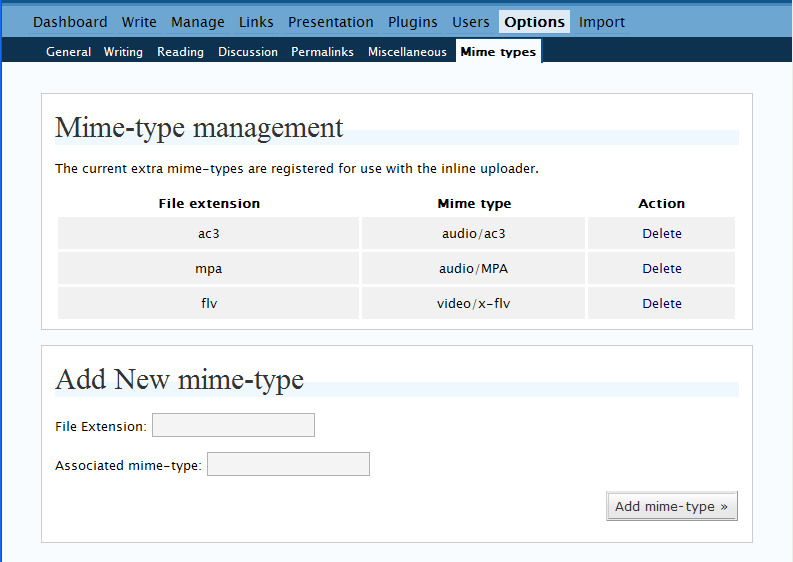
screenshot of the plugins options page

By default the following extra mime-types are registered: audio/ac3, audio/MPA and video/x-flv.

The latest version of the plugin may be downloaded here: pjw-mime-config.0.50.zip

« This entry is part of a series read the rest: 1, 2, 3 »
Read 10 Comments

10 Comments »

That didn’t work either. Your comments plugin is screwing up my attempts to provide the solution to a problem.

Line 98: you forgot the php after the angle-question php delimiter.

Comment by drivingmenuts — 27/6/2006 @ 9:36 pm §


drivingmenuts: Yes I do seem to have included some shorttags in the plugin code oops. I will fix this in an updated version together with some other new features I hope to release soon time permitting.

Comment by westi — 5/7/2006 @ 2:28 pm §


Great - thanks!

Comment by Martin — 21/7/2006 @ 12:51 am §


[...] A while ago I released a simple plugin which allows you to manage the mime-types supported by the WordPress inline-uploader. This plugin worked well for most people baring a issue with php shorttags which made it break some sites. However, some people requested an update to the plugin to support adding a large list of mime-types from a file. I am proud to announce that finally after many months of sitting there 95% finished I am ready to release this plugin update. [...]

Pingback by Peter Westwood » pjw-mime-config v0.90 released — 3/9/2006 @ 12:54 pm §


[...] This could be the problem. November 16, 2006, 2:35 pm o’clock [...]

Pingback by Vie de Malchance — 17/11/2006 @ 2:50 pm §


Thanks Peter, plugin works fine for me :)

Josef.

Comment by Josef Davies-Coates — 22/1/2007 @ 4:16 pm §


The “Add mime-types from file” feature gives me an error

Error: Missing a temporary folder.

Thanks.

Leslie

Comment by Leslie — 29/6/2007 @ 9:53 pm §


Leslie that means that the php install on your server is unable to write to the temporary folder and so cannot support file uploads. See http://www.php.net/manual/en/features.file-upload.errors.php for more info.

Comment by westi — 30/6/2007 @ 11:45 am §


I was hoping it meant something other than that. What verbiage shall I use when explaining it to the tech support guys?

What I’m trying to do is create a barebones document management system using Wordpress as a CMS. I work for a small company that has NOTHING in the way of document control, so the act of stuffing them all in the same place, dated, categorized and tagged, is going to give us a big head start.

I entered several mime types manually and was able to upload the new file types. Thanks for the great plugin.

Comment by Leslie — 30/6/2007 @ 12:31 pm §


Quick Question:
I am using a txt file in my blog:
Example Post
When I click on the file it opens it –> how can I set it to download instead?

I appreciate your Help

Mike

Comment by Mike — 15/1/2008 @ 2:35 pm §


RSS feed for comments on this post. TrackBack URI

Leave a comment

XHTML: You can use these tags: <a href="" title=""> <abbr title=""> <acronym title=""> <b> <blockquote cite=""> <cite> <code> <del datetime=""> <em> <i> <q cite=""> <strike> <strong>

21 queries. 0.854 seconds. Powered by WordPress. This blog is protected by Spam Karma 2: 208537 Spams eaten and counting...