The new kid on the block coComment is getting a lot of buzz at the moment. It’s invite only at present but I registered this morning an an invite code was winging it’s way to me within the hour. First impressions are good.
The ability to keep track of all those blog posts that I’ve commented on is something I’ve wanted to be able to do easily for a while. (via Climb to the Stars and Weblog Tools Collection)
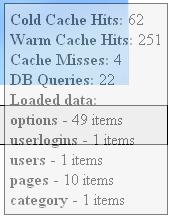
I am please to announce a new WordPress plugin which allows you to peek under-the-hood at the new cache in WordPress v2.0 (and v2.0.1) and to see what it is doing. A semi-transparent window is displayed for the admin user at the top right hand corner of your blog. It also allows the admin user to easily clear the cache from within the WordPress adminitration interface.
Cold Cache Hits
This is the number of cached items that were loaded from disk.
Warm Cache Hits
This is the number of cached items accessed that were already in memory
Cache Misses
This is the number of items that had to be fetched from the db as they were not in the cache.
Loaded data
This lists the type and amount of data loaded into memory from that currently stored within the cache..
Head on over to the wp-cache-inspect page for more info and to download.